
I once worked on a page that should have been winning. The content was solid, and the backlinks were strong. Yet traffic stayed flat. The culprit was a generic title tag and a meta description that ignored what searchers actually wanted. That experience showed me how much meta tags for SEO can change a page’s results.
In this guide, you’ll learn what they are, why they matter, and how to use them well.
What Are Meta Tags for SEO?
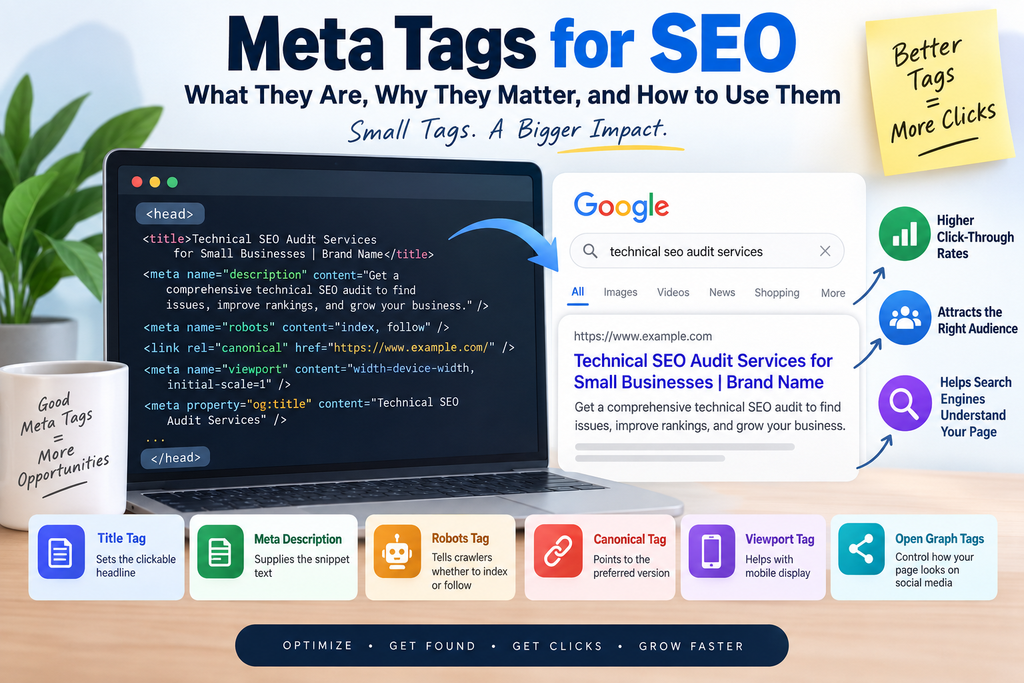
Meta tags are small snippets of HTML code that sit in a page’s <head> section. Visitors don’t see them on the page itself. Search engines, browsers, and social platforms read them instead.
Meta tags for SEO are the ones that help search engines understand a page and help searchers decide whether to click. Some appear right in search results. Others give crawlers instructions.
Why Meta Tags for SEO Matter
Let’s start with an honest look at what they do and don’t do.
They Don’t Guarantee Rankings
Meta tags won’t rescue thin content or a weak site. Google has said the meta description isn’t a ranking factor, and it ignores the meta keywords tag entirely. Anyone promising instant rankings from a tag tweak is overselling.
They Shape How People See and Click Your Page
Your title tag and meta description form your first impression in search results. Well-optimized meta tags for SEO can help make your page more relevant to searchers and encourage the right users to click through to your website.
That’s what turned around the page I mentioned earlier. I rewrote the title and description around the primary keyword and the searcher’s intent. Over the following weeks, impressions, click-through rate, and organic traffic all improved.
Table of Contents
The Meta Tags That Matter Most
| Meta tag | What it does | Priority |
| Title tag | Sets the clickable headline in search results | High |
| Meta description | Supplies the snippet text under the title | High (for clicks) |
| Meta robots tag | Tells crawlers whether to index a page or follow its links | Medium |
| Canonical tag (technically a link element) | Points to the preferred version of similar pages | Medium |
| Viewport meta tag | Helps pages display properly on mobile | Medium |
| Open Graph tags | Control how links preview on social platforms | Low for SEO |
Title Tag
Make each title unique and descriptive. Put the main keyword near the front. Aim for roughly 50–60 characters, because Google truncates titles by pixel width, not a strict character count.
Meta Description
Write about 150–160 characters that summarize the page and invite the click. Keep in mind that Google often rewrites descriptions to match a query. Treat yours as a strong suggestion, not a guarantee.
Robots, Canonical, and Viewport Tags
Use a noindex robots tag for pages that shouldn’t appear in search, such as thank-you pages. Add canonical tags when several URLs show similar content. Include the viewport tag on every page so mobile visitors get a readable layout.
Where Beginners Should Start
If you fix only one thing, fix your page titles first. Make each one unique, descriptive, and focused on the page’s main keyword. Titles strongly influence search relevance and click-through rates, so they deliver the biggest return for the least effort.
Here’s a quick illustration (a made-up example):
- Weak: Services | Brand Name
- Better: Technical SEO Audit Services for Small Businesses | Brand Name
The second version tells both searchers and Google exactly what the page covers.
How to Audit Meta Tags for SEO in Five Steps
Here’s the process I follow on every site:
- Crawl the site. Use Screaming Frog or Semrush to collect every title and meta description.
- Flag problems. Look for missing, duplicate, or overly long tags.
- Compare with the page. Check each tag against the page’s content and target keyword.
- Rewrite weak tags. Focus on relevance and click-through rate.
- Re-crawl and monitor. Track results in Google Search Console and Google Analytics.
The Most Common Meta Tag Mistakes
The mistake I see most often is duplicate or missing title and meta description tags. Both can hurt search visibility and click-through rates.
On one site, I found several pages sharing the same meta description. I rewrote each description to match its page and added unique, keyword-focused titles. Relevance and click-through rates improved.
Other mistakes to watch for:
- Titles so long they get cut off in search results
- Keyword stuffing in titles or descriptions
- Descriptions that promise something the page doesn’t deliver
- A leftover noindex tag that blocks a page you want ranked
Meta Tags for SEO: FAQs
Do meta tags affect rankings?
The title tag influences relevance, and it strongly affects clicks. The meta description isn’t a direct ranking factor, and Google ignores the meta keywords tag.
How long should a title tag or meta description be?
Aim for about 50–60 characters for titles and 150–160 for descriptions. Google’s display limits vary, so preview before you publish.
Will Google always use my meta description?
No. Google may rewrite it to better match a searcher’s query.
How often should I check my meta tags?
Check after every launch or redesign, and whenever click-through rates drop.
Conclusion
Meta tags for SEO won’t replace great content, but they decide whether that content gets clicked. Start with your titles, make every tag unique, and match each one to search intent. Then audit, rewrite, and measure.
On-Page SEO Checklist
Internal links (add at least one):
- Use the anchor “SEO audit” or “search intent” and link it to your own related post or service page.
- You can also naturally use “meta tags for SEO” as an anchor text if you have a relevant internal page about SEO fundamentals or on-page SEO.
Authoritative external references:
- Google Search Central, “Control your snippets in search results”
- Google Search Central, “Influence your title links in search results”
- Google Search Central, “Meta tags Google supports”
Double-check these references before publishing, since Google occasionally reorganizes its documentation.
Images, prompts, and alt text:
- Image 1: Place after the introduction. Use a clean illustration of a Google search result highlighting the title tag and meta description.
Alt text: “Meta tags for SEO in a Google search result” - Image 2: Place after the section explaining why meta tags matter. Use an annotated search result showing the title tag, URL, and meta description.
Alt text: “How meta tags for SEO appear in search results” - Image 3: Place after the five-step audit section. Use your own screenshot showing a duplicate or missing meta tag report.
Alt text: “SEO audit showing meta tags for SEO issues” - Image 4: Place after the common mistakes section. Use your own Search Console screenshot showing impressions and clicks before and after optimization.
Alt text: “Search performance after optimizing meta tags for SEO”
Video or embed: A short screen recording of your own SEO audit walkthrough would fit well under the five-step audit section. A Google Search Central video about title links and search snippets can also provide useful supporting information.
Schema: Use Article schema for the blog post. You can also use FAQPage schema for the FAQ section where appropriate. Keep in mind that FAQ rich results are currently limited to certain types of sites, so the markup should primarily be used to help search engines understand the content rather than expecting a visible FAQ result.
Keyword note: The primary keyword “meta tags for SEO” should appear naturally in important areas such as the H1, SEO title, meta description, introduction, relevant H2 headings, conclusion, and selected image alt text. Avoid forcing the keyword into every section. A natural keyword distribution is preferable to keyword stuffing.
For this article, you can also use related terms such as meta tags, title tags, meta descriptions, SEO tags, robots meta tag, canonical tags, on-page SEO, search snippets, and search intent to provide topical relevance.
Experience signal: Your personal example about improving a page’s title and meta description adds useful first-hand context. If you have actual before-and-after data, such as changes in impressions, click-through rate, or organic traffic, include those figures. Specific results can make the experience section more credible and useful to readers.
Looking for the best SEO expert in Kochi to improve your website’s visibility and attract more potential customers? A professional SEO expert can help your business achieve higher search engine rankings through effective keyword research, on-page optimization, technical SEO, quality content, and strategic link building. Whether you run a local business, e-commerce store, or service-based company, working with an experienced SEO expert in Kochi can help increase organic traffic, improve online visibility, and generate more qualified leads. Choose the right SEO professional who understands your business goals and delivers a customized strategy for sustainable search engine growth.